# Containers Operating Systems 2 Lecture <small>Warsaw University of Technology<br/>Faculty of Mathematics and Information Science</small> --- ### Hardware sharing It's **only** the case of personal machines that are used by a single user having total control of every aspect of the machine. A single datacenter machine is utilized by lots of users (applications). * **Cost Efficiency:** Bare-metal servers, power, and datacenter space are incredibly expensive. * **Underutilization:** A single application rarely consumes 100% of a modern server's CPU and RAM. * **Management Scale:** It is vastly easier to maintain a cluster of a few powerful machines than thousands of weak, dedicated ones. --- ### Shared environment issues Just allowing to share single system by a set of applications unaware of each other is likely a bad idea: * **Resource Starvation:** One aggressive or buggy process (memory leak, infinite loop) can crash everything else. * **Security & Privacy:** Processes running on the same OS could potentially read each other's memory, files, or intercept traffic. * **Dependency Conflicts:** "App A" needs `libssl 1.0`, while "App B" strictly requires `libssl 2.0`. * **System Usage Conflicts:** Apps A and B write to the same directory, bind the same port, etc. --- ### Virtualization Virtual Machines provide Hardware Virtualization. * Emulate the entire hardware stack (CPU, RAM, Disk) * Each machine runs its own **full operating system** (Guest OS) * A Hypervisor manages access to the physical hardware A Hypervisor might be an application, which accesses hardware through host OS or a baremetal OS-like software having direct hardware access (more efficient). --- #### Virtualization CPU modes Guest OS obviously may not have direct hardware access. CPUs implement dedicated modes for the purpose of guest OS execution. Application code runs **unprivileged, non-root mode**. A syscall switches CPU to **privileged, non-root mode** which is also a sandbox! Some instructions like hardware access will trap the CPU into regular, root mode. 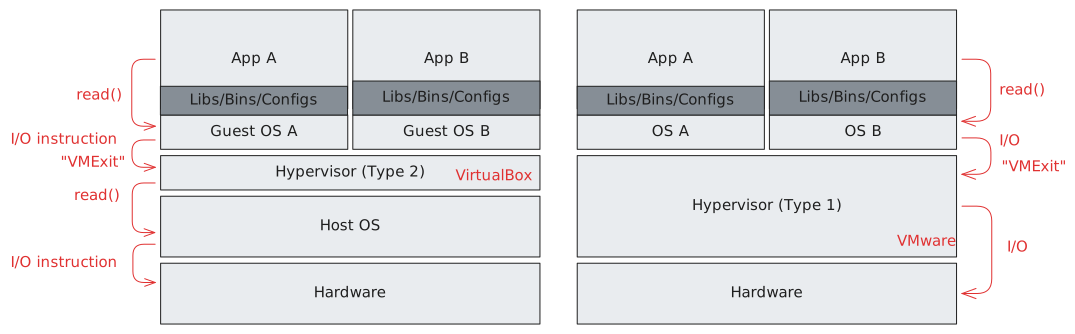 --- ### Containerization Containers provide OS-level Virtualization. Processes run directly on the host system (Host OS) and share the exact same Kernel. * **Lightweight:** Container consumes only the RAM its processes actually use. * **Instant startup:** Launching a container =~ starting new process. * **High density:** One can easily run thousands of containers on a single host. * **Weaker isolation:** A critical exploit in the Linux kernel within a container can theoretically compromise the entire host. * **Shared kernel limitation:** You cannot run a Windows container natively on a Linux kernel (without a hidden VM in the background). --- Containerized processes are **isolated by the OS** which employs container-aware syscall handling and resource management. 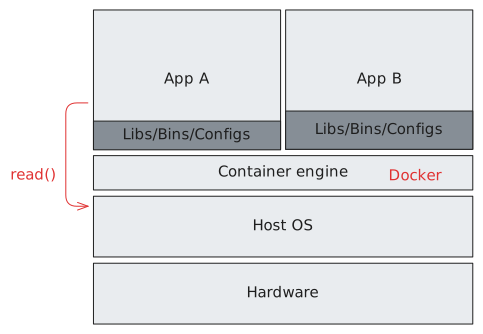 --- ### A Brief History of Isolation Containers are the evolution of operating system mechanisms. * **1979:** `chroot` (V7 UNIX) – file system isolation. * **2000:** FreeBSD Jails – system partitioning, dedicated IPs, process isolation. * **2004:** Solaris Zones – full OS-level virtualization. * **2006/2008:** cgroups + Namespaces (Linux) – the foundation for containers in Linux. * **2008:** LXC (Linux Containers) – the first fully-fledged Linux containers. * **2013:** Docker – introduction of layered images (UnionFS) and cool UX. --- ### What is container? A container is simply a **regular process (or a group of processes)** running on the host OS, upon which the Kernel has imposed highly specific filters and boundaries. To create this "illusion" of a separate system, the kernel utilizes three main pillars: 1. **Namespaces** – isolate what the process can *see*. 2. **Control Groups (cgroups)** – limit what the process can *use*. --- ### Namespaces Each Linux process is associated with several namespaces, dictating what other parts of the system it might interact with: * **PID** Process tree isolation. Container processes do not _see_ processes outside. * **NET** Private networking stack: interfaces (`veth`), addressing, routing * **MNT** Separate filesystem mounts. Containers see own filesystem (OverlayFS). * **UTS** Emulates separate `hostname` and domain name * **IPC** POSIX/SysV named shared memory, semaphores, mqueues isolation * **USER:** (Optional) User ID mapping. Container `root` (UID 0) becomes unprivileged host user (UID 1000) --- #### PID namespaces Containers see an isolated, private process tree. From host perspective container tasks have some regular high PID. From within the container PIDs are different. 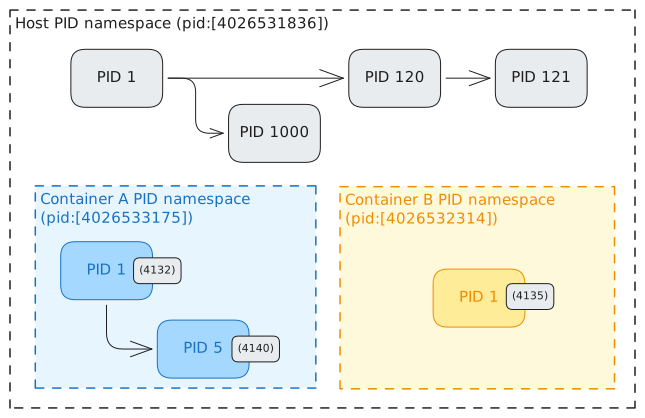 Namespace root process is responsible for orphan handling. --- #### PID namespace implementation Kernel must manage multiple (hierarchical!) PIDs for each task. ```c struct task_struct { /* ... */ struct pid *thread_pid; /* ... */ }; struct pid { atomic_t count; unsigned int level; // Namespace depth. 0 = host. struct upid numbers[1]; // Grows as needed. }; struct upid { int nr; // PID value at given level struct pid_namespace *ns; }; ``` --- ### The Engine of Isolation: clone() In Linux, containers are fundamentally built using the `clone()` system call. While `fork()` creates a copy of a process, `clone()` allows fine-grained control over what is shared and what is isolated. ```c int clone(int (*fn)(void*), void *stack, int flags, void * arg, ...); ``` The Isolation Flags: * `CLONE_NEWPID` - New process tree (Child becomes PID 1). * `CLONE_NEWNS` - New Mount namespace (Isolated filesystem). * `CLONE_NEWNET` - New Network stack (Empty interfaces, own IP). * `CLONE_NEWUTS` - New Hostname and Domain. --- ### NET namespaces Network namespace provide isolated set of interfaces, routing table, ARP, iptable rules, etc. Typically, container gets own `veth` pair plugged into host side bridge (virtual switch). Host `iptables` rules forward outbound traffic to the internet. 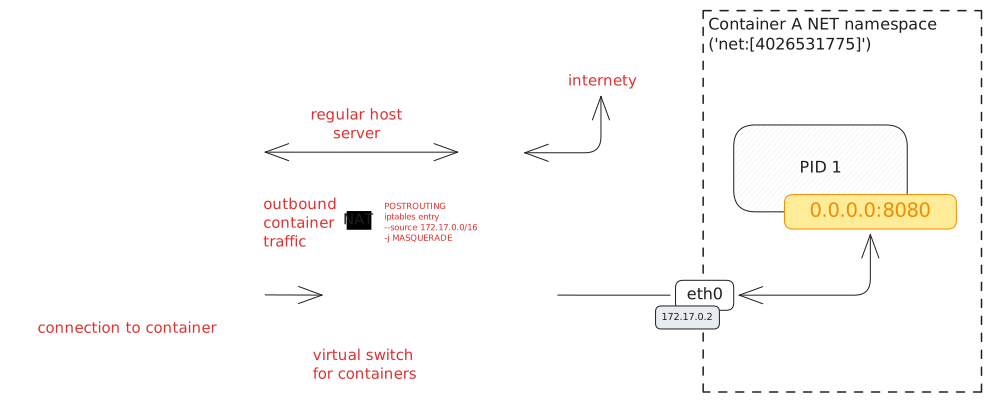 --- ### Port exposing Containers providing services to outside world **export ports**. This adds additional `iptables` rules forwarding traffic targeting given port to the container. 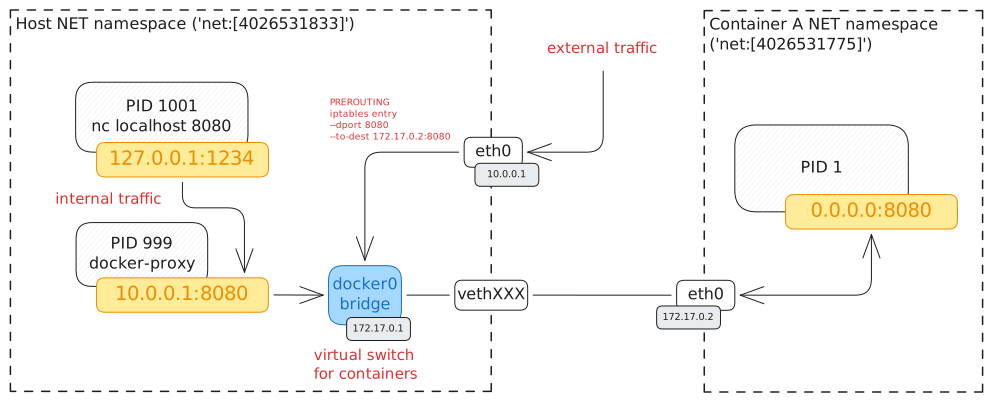 For the purpose of capturing localhost communication a thin proxy process binds the port and forwards connections to the container. --- ### MNT namespaces Linux provides singe directory tree. System maintains map of **mount points**: _path-to-filesystem_ mapping specifying what sits ```text / (ext4 - main SSD, rootfs) ├── /boot (vfat - EFI boot partition) ├── /proc (procfs - virtual process view) ├── /sys (sysfs - virtual devices view) └── /mnt └── /usb_drive (exfat - external USB drive) ``` Processes may have different mount tree than the host OS with **MNT namespaces**. ```text task_struct [PID 1: host systemd] └── mnt_ns (mnt:[4026531832]) └── / (ext4 - main SSD, rootfs) task_struct [PID 14592: container] └── mnt_ns (mnt:[4026532064]): └── / (overlayfs (/var/lib/containerd/...)) ``` --- ### Overlay FS Docker creates containers based on **images** containing packed root filesystem contents. When creating container, docker first obtains the specified image, unpacks it into some directory and provides in as root mount. To save disk space, docker mounts `overlayfs` - filesystem driver parametrized with `lowerdir` and `upperdir`. Only the `upperdir` is writable. It serves as a passthrough on reads. Writes do override lower layer contents. 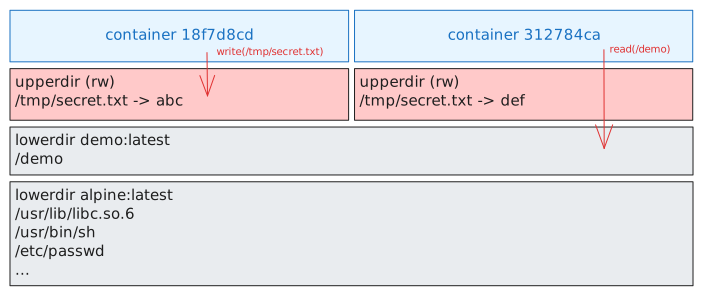 --- ### Control Groups Namespaces isolate what processes may see and access. Control groups (`cgroups`) decide how much resources process may use. Without resource limiting containers may cause starvation or crashes of other containers. A _control group_ specifies limits on resources like CPU, memory, etc. Processes may be then associated with a control group, impacting their treatment by scheduler and memory manager. CGroups are managed through filesystem interface: ```bash sudo mkdir /sys/fs/cgroup/my-cg # Create new cgroup ls /sys/fs/cgroup/moj_kontener # Explore what there is echo "524288000" > /sys/fs/cgroup/my-cg/memory.max ``` ```bash echo $PID | sudo tee /sys/fs/cgroup/my-cg/cgroup.procs ``` --- ### Putting it all together What exactly happens under the hood when you execute a container? `docker run` is a complex multistep process utilizing all the discussed, fancy OS features: 1. `docker` pulls the image and extracts its read-only layers. 2. A new read-write `upperdir` is created. OverlayFS binding both is created. 3. A new directory is created in `/sys/fs/cgroup/`. Requested limits (e.g., CPU, memory) are written to the respective configuration files. 4. A new `veth` pair is created. One end is attached to the host's virtual switch. 5. `iptables` rules for NAT/port forwarding are injected. 6. The runtime invokes `clone()` isolating all namespaces. 7. OverlayFS is mounted as a new `/` filesystem. 8. The free `veth` end is moved into the child's Network Namespace. 9. Child process calls `execve()` to begin target binary from the overlayfs, which now runs as **PID 1** inside the jail.