# Networking Basics Operating Systems 2 Lecture <small>Warsaw University of Technology<br/>Faculty of Mathematics and Information Science</small> --- ### What networking provides? Networking is simply `IPC (Inter-Process Communication)` where interacting processes run within distinct Operating Systems. 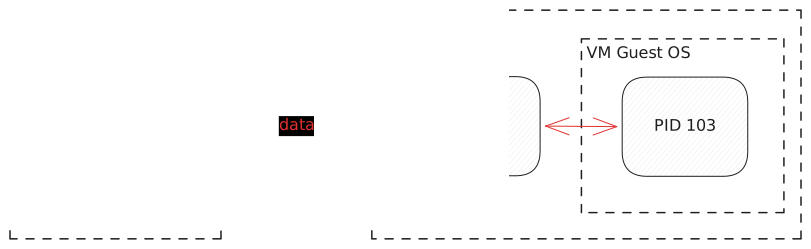 Processes cannot possibly share memory. They may reside on distinct physical machines (or virtual ones). The OS has to hide physical network complexity, provide API for accessing the network and implement it safely and efficiently. --- ### Packets Networks (both physical and virtual) transmit messages called **packets**: contiguous byte sequences encoding both application data and also network-specific metadata, needed to deliver the packet successfully. 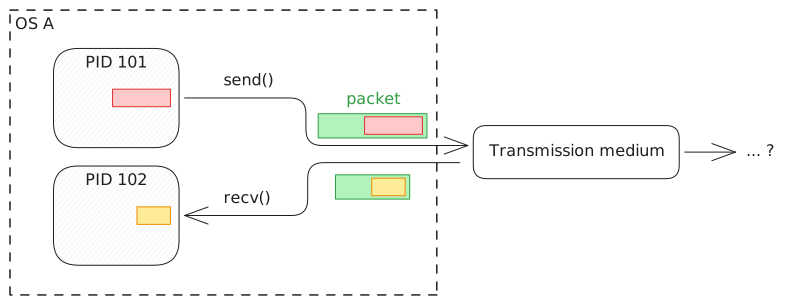 Packets are generated by the OS in response to application requests and sent over transmission medium. OS also receives packets and delivers payload to the appropriate application(s). --- ### Network interfaces The OS manages devices (physical or virtual) connected to the transmission medium, capable of sending and receiving packets, called **network interfaces**. 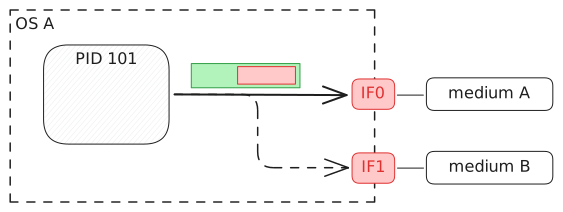 Interfaces have system-wide unique (sometimes descriptive) names like `eth0`, `enp3s0`, `wlan0`, `lo`, etc. --- ### Network addresses To identify the device for the network perspective OS assigns **address(es)** to the device, unique network-wide. 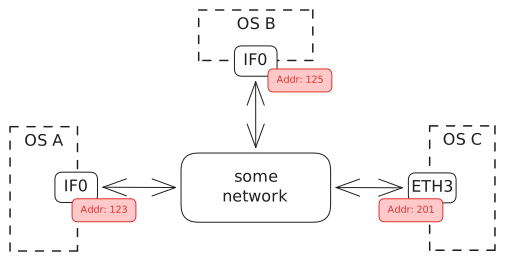 Those are usually numerical identifiers in some format, <br/>i.e. `192.168.4.13` in case of 4-byte IPv4 address. Thanks to addressing the network may forward a packet correctly to its destination. --- ### `ip` command `ip` on Linux is a powerful utility used to manipulate all network-related aspects of the system. `ip addresss` or `ip a` for short lists network interfaces and their configuration: ```shell ip address 1: lo: link/loopback 00:00:00:00:00:00 brd 00:00:00:00:00:00 inet 127.0.0.1/8 scope host lo inet6 ::1/128 scope host noprefixroute 2: wlp4s0: link/ether 04:68:74:66:52:32 brd ff:ff:ff:ff:ff:ff inet 192.168.188.59/24 brd 192.168.188.255 inet6 fd00::abca:cf0b:5a2c:d9cf/64 ``` _Note: The above output is intentionally simplified._ --- ### Netcat (`nc` command) To run demos we need a userspace program which interacts with network. Before diving into C interface we'll use existing tools to send some data around. Netcat `nc` is a versatile utility which reads incoming network data and dumps it into `stdout` as well as reads from `stdin` and writes to the network. * Client mode: `nc [ip] [port]` * Server mode: `nv -l -p [port]` _Note: Back in the days `telnet` was a similar popular tool._ --- ### Netcat connection setup When netcat client is executed it must use a syscall to tell host OS that it wants to connect somewhere. In response the OS has to generate packet(s) which are going to reach server side process, which passively awaits incoming connections. OS has to then send this packet via a correct interface.  To understand how this works in detail let's look into the packets themselves! --- ### Packet dumps To see what happens over the network we'll use a sniffing tool like `tcpdump`. ```shell sudo tcpdump -i <iface> -n ``` * `-i <iface>` captures all traffic going through interface `<iface>` * `-n` displays raw IP addresses instead of converting them to human-readable DNS names. Tool prints line per packet describing its meaning: ```text 17:42:16.045648 IP 10.0.0.1.43494 > 10.0.0.2.80: Flags [P.] 17:42:16.045669 IP 10.0.0.2.80 > 10.0.0.1.43494: Flags [.] 17:42:16.909928 IP 10.0.0.1.43494 > 10.0.0.2.80: Flags [P.] 17:42:16.909942 IP 10.0.0.2.80 > 10.0.0.1.43494: Flags [.] ``` Generated dump can be later analyzed using graphical tools like `wireshark`. --- ### Example: HTTP request Using `nc` let's send a request to an external HTTP server `mini.pw.edu.pl`: ```shell echo -ne "GET / HTTP/1.1\r\nHost: mini.pw.edu.pl\r\n\r\n" \ | nc mini.pw.edu.pl 80 ``` Significant number of packets is generated in response and visible in a dump: ```text 192.168.1.14 → 194.29.178.38 74 45558 → 80 [SYN] 194.29.178.38 → 192.168.1.14 74 80 → 45558 [SYN, ACK] 192.168.1.14 → 194.29.178.38 66 45558 → 80 [ACK] 192.168.1.14 → 194.29.178.38 106 45558 → 80 [PSH, ACK] 194.29.178.38 → 192.168.1.14 66 80 → 45558 [ACK] 194.29.178.38 → 192.168.1.14 533 80 → 45558 [PSH, ACK] 192.168.1.14 → 194.29.178.38 66 45558 → 80 [ACK] 192.168.1.14 → 194.29.178.38 66 45558 → 80 [FIN, ACK] 194.29.178.38 → 192.168.1.14 66 80 → 45558 [FIN, ACK] 192.168.1.14 → 194.29.178.38 66 45558 → 80 [ACK] ``` --- ### Dissecting a packet Let's look at the first packet relevant to our request.  It has 74 bytes and is a sequence of automatically generated headers. It was sent from local machine to the remote server as a first step of connection establishment process. --- ### Encapsulation Application data is always _wrapped_ or _encapsulated_ by the OS which prepends (sometimes appends) those headers.  _Note: On wire there's also Ethernet I header and trailer, added and removed by the NIC hardware, thus not visible to the OS nor any tool like wireshark._ --- ### The Networking Stack <small>As the data travels from a userspace application it passes through several kernel layers. Each knows about the one below only. Each adds/strips its header to the packet coming from the layer above/below. </small>  --- ### What do Layers do? Each layer is a bunch of functions and data structures using API of a layer below. 1. **L5-6-7 uppper** (i.e. `nc`) Application creates (optional) payload and uses syscall to pass it to transport layer ( L4) for sending out. 2. **L4 transport** (i.e. TCP) Handles exchanging **messages** between applications running on different hosts, regardless of how the underlying-network is implemented. It glues its headers which describe which application sends and should receive the data. Then it eventually passes a **message** into the network layer (L3). 3. **L3 network** (i.e. IP) Splits message into **packets**, handles addressing and routing, delivering them to target host across the whole network. Prepends packets with an L3 header and passes them into L2. 4. **L2 data link** (i.e. Ethernet) Wraps packets into data **frames** which it can then send over physical network to a device connected to the same network. It handles device addressing, transmission medium access control and error detection. Calls into L1 to send generated frame over unreliable medium. --- ### Local networks (L2) L2 solves _simple_ problem: sending **frames** between a group of physically interconnected hosts, together forming a **Local Area Network**. It does **not** aim solve global-scale communication.  Back in the days everyone would have their own, incompatible L2 technology (token rings, ARCNET, X.25, ...). Ethernet is an omnipresent standard today. --- ### L2 Ethernet Header L2 protocol, implemented in hardware or in code, is concerned only with L2 header.  Ethernet specifies a simple header with just 3 fields: * (6b) destination address * (6b) source address * (2b) upper layer protocol<br/>(i.e. `0x0800` = IPv4, `0x86DD` = IPv6) --- ### MAC addresses Ethernet specifies 48-bit long addressing of the hosts (interfaces). Those are **usually** globally unique, assigned by the interface manufacturer in format `[OID 24b]:[SID 24b] = [Manufacturer ID]:[Serial ID]`. MAC addresses do **not** form a geographical hierarchy, thus do not allow for building scalable, global networks. `src` address populated by the kernel with the address of the local outbound interface. It is useful for the recipient as the **reply-to** address. ```text ip address [...] 3: wlp4s0: <BROADCAST,MULTICAST,UP,LOWER_UP> mtu 1500 UP link/ether 04:68:74:66:81:35 brd ff:ff:ff:ff:ff:ff ``` You have to know the `dst` address! Usually kernel discovers it automatically. --- ### Switch operations Switches think simple: _Something from `11:22:33:44:55:66` came from `eth2` recently. Everything going to `11:22:33:44:55:66` should go to `eth2`!_  --- ### Isn't L2 enough? If switches are so smart, why do we need something above at all (IP)? * **Flat Addressing:** MAC addresses have no hierarchy or geographical meaning. They are tied to the hardware vendor, not the network location. * **The Flooding Problem:** Switches learn by flooding unknown destinations. Imagine broadcasting a packet to 5 billion devices globally just to find a specific server. The Internet would instantly collapse under the weight of broadcast traffic. * **Medium Dependency:** L2 protocols are tied to physical cables and signals (Ethernet, Wi-Fi, LTE). We need a universal protocol to bridge entirely different physical networks together. --- ### Enter Layer 3: The Network Layer How does the Internet Protocol (IP) solve L2's limitations? * **Hierarchical Addressing:** IP addresses are logical and group devices into **Subnets**. Just like postal codes, they allow routers to summarize millions of hosts into a single routing table entry. * **Routing Instead of Flooding:** Routers connect different networks. Unlike switches, if a router doesn't know a destination, it does *not* broadcast. It forwards the packet to a **Default Gateway** or simply drops it. * **Hardware Agnostic:** IP was invented to bridge the gap between many L2 technologies. IP frames may be encapsulated differently depending on the underlying link layer technology used. ---  _Note that each addressable host on the IP network has to have both IP address and L2 technology specific hardware (i.e. MAC) address._ --- ### L3 IP Header As the packet travels through the IP network, it is always encapsulated within some L2 envelope (i.e. Ethernet header). IP packet itself usually has 20 byte header with `src` and `dst` IP addresses:  --- ### L3 device operations (receive) IP device (router or host), like a switch, may have several interfaces attached to a number of L2 networks. It processes IP packets incoming from attached networks: - receive L2 frame from some other host on the **directly attached** L2 network - `src` hardware address is the L2 address of this other host - `dst` hardware address should be L2 address of receiving port - strip the L2 header to extract the IP **packet** - **decide what to do with it** - stop if it's for me (forward to local L4) - drop it if it's not for me (discard) - send it elsewhere (that's what routers do) --- ### L3 device operations (send) Same, it might want to send IP packets: - based on the `dst` IP address it must pick the **outbound port** - pick a target host on the L2 network accessible through the outbound port - note this might not be the destination IP host itself - it must wrap the packet into a network-specific L2 frame - `src` hardware address is the outbound port's L2 address - `dst` hardware address is the destination host's L2 address - send it out! --- ### Router operations Routers are IP devices configured to forward packets between networks. Upon receiving a packet: - based on the `dst` IP address pick where (which port) to forward the packet to: - (a) some host within one of the directly attached networks - (b) some network indirectly accessible through intermediate router(s) - wraps the packet back into the L2 frame and sends it out - IP `src` and `dst` addresses remain unchanged - L2 `src` address the router's outbound interface address - (a) L2 `dst` address is directly the hadware address of the target host - (b) L2 `dst` address is the next _hop_ router hardware address ---  _Note the L3 addressing remains unchanged while L2 addresses are changed!_ ---  --- ### Address Resolution Protocol (ARP) Once we know that a packet should be sent directly to host `192.168.1.100` via interface `eth0`, or to the router at `192.168.2.254` via interface `eth1` we have to find out the L2 address of target L2 device. - sender sends an ARP request to **broadcast L2 address**:<br/>L2 `02:FA:B7:44:81:ED > ff:ff:ff:ff:ff:ff`<br/>L3 ARP Request: _who-has 192.168.1.100?_ - only the host having IP address `192.168.1.100` replies:<br/>L2 `D8:49:06:E1:92:AB > 02:FA:B7:44:81:ED`<br/>L3 ARP Response: _10.0.0.2 is-at D8:49:06:E1:92:AB_ --- ### ARP Packet format Offset (Bytes) | Field Name | Size (Bits) | Example ----------------|-------------------|-------------|----------------------------------------------------- 0 | Hardware Type | 16 | Ethernet = `0x0001` 2 | Protocol Type | 16 | IPv4 = `0x0800` 4 | Hardware Length | 8 | Ethernet = `6` 5 | Protocol Length | 8 | IPv4 = `4` 6 | Operation | 16 | `1` = ARP Request 8 | Sender HW Addr | 48 | `02:FA:B7:44:81:ED` 14 | Sender Proto Addr | 32 | `192.168.1.10` 18 | Target HW Addr | 48 | `00:00:00:00:00:00` 24 | Target PRoto Addr | 32 | `192.168.1.100` --- ### The routing table The decision where to forward some IP packet is made based on the **routing table**: ```bash $ ip route default via 192.168.1.1 dev eth0 proto dhcp metric 100 10.0.0.0/24 via 192.168.2.254 dev eth1 192.168.1.0/24 dev eth0 scope link src 192.168.1.100 ``` * `192.168.1.0/24`: directly connected network: _if the `dst` address starts with `192.168.1.` send it via `eth0` to a directly accessible host_ * `10.0.0.0/24`: specific route: _if the `dst` address starts with `10.0.0.` send it via `eth1` to the router at 192.168.2.254_ * `default` or `0.0.0.0/0`: _If the destination IP doesn't match any other rule, send it via `eth0` to `192.168.1.1` and hope they know what to do._ --- ### IP Fragmentation L3 devices may split and reassemble IP packets. This is known as **fragmentation** and **reassembly**. IP header contains `Identification`, `Flags` and `Fragment Offset` fields which are used to keep track of fragmentation.  --- ### TTL (Time To Live) TTL (Time To Live) is a field in the IP header that specifies how long a packet may be stored in the network before it is discarded. Each time a packet is forwarded, routers automatically decremented it by 1 and sent back an ICMP message to the original sender. Both improve the stability of the global network. --- ### Internet Control Message Protocol (ICMP) ICMP is an auxiliary L3 protocol used to report errors in the IP layer. It defines several types of hinting messages: * **Echo Request & Reply:** USed to verify basic connectivity and latency to another host (aka. `ping`). * **Destination Network/Host Unreachable:** Generated by a router when it drops a packet because it has no path to the requested IP address in its routing table. * **Destination Port Unreachable:** Generated by the receiving host when a packet arrives, but no application is actively listening on that specific UDP/TCP port. * **Time Exceeded:** Generated by a router when a packet's Time To Live (TTL) drops to zero, killing the packet to prevent infinite routing loops (the core mechanism of `traceroute`). * **Note neither L2 nor L3 do anything to guarantee delivery of packets!**